


Key Takeaways
- Canopy is recognized by SafeWise as the best parental control app for blocking explicit content, thanks to its AI-powered Smart Filter and sexting prevention features.
- Independent reviewers (Cybernews, SafetyDetectives, AllAboutCookies) confirm that the real-time visual filtering works, and that it is Canopy’s clear differentiator from competitors.
- Canopy is not a do-everything monitoring suite. It does not currently offer text scanning or social media message monitoring (beyond sexting alerts).
- Android performance is stronger than iOS, a common challenge across all parental control apps due to Apple’s platform restrictions.
- Customer support is a consistent bright spot in user reviews, with fast response times and helpful agents.
- All plans include a 7-day free trial and a 30-day money-back guarantee.
If you are searching for honest Canopy reviews, you are probably weighing whether the app is right for your family or for yourself. We appreciate that. One important note upfront: because Canopy is most often reviewed as a parental control app, many third-party reviews focus on parent-and-child use cases. Where relevant, we also point out what those findings mean for adults using Canopy for personal filtering and accountability.
The short version: Canopy earns consistent praise for its AI-powered explicit content filtering, a feature that independent testers confirm works differently (and in many cases, more effectively) than traditional blockers. At the same time, reviewers point out that Canopy is a specialized tool, not an all-in-one monitoring suite. Some families will find that focus is exactly what they need. Others may want to pair it with a second app for broader monitoring.
Below, we break down what credible third-party reviewers have found (including broader category roundups like Wirecutter), share feedback from real parents and adult users, and help you decide whether Canopy is the right fit.
What Makes Canopy Different
Most parental control apps rely on blocklists: pre-built databases of known harmful websites. If a site is on the list, it gets blocked entirely. If it is not on the list, it gets through.
Canopy takes a different approach. Its AI-powered Smart Filter scans images and videos in real time as your child (or you) browses the web. When it detects explicit visual content, it whites out just that content, leaving the rest of the page accessible. This means your child can use everyday sites like Instagram or Google Images without you needing to block them wholesale.
Canopy also includes a Sexting Alerts feature that (depending on the device) detects when an explicit photo is taken or received on the device, locking it before it can be sent or saved. Parents receive an alert, creating an opportunity for a conversation rather than a crisis.
These two features are the core reason reviewers consistently recognize Canopy. They are also the reason we built the app: to give families a smarter parental control that filters the harmful content without blocking the entire internet.
Expert and Independent Reviews
We believe transparency builds trust. Here is what respected, independent review sites have said about Canopy after hands-on testing. We include the praise and the criticism, because both help you make a better decision.
The New York Times Wirecutter Review: A Helpful Screen Time Lens, and How Canopy Fits In
We appreciate The New York Times Wirecutter review and the care that goes into their parental control app testing. Wirecutter is a trusted resource for many families, and their roundup is especially helpful for parents comparing tools for screen time management, ease of use, and day-to-day device controls.
That said, many people who land on Canopy reviews are trying to solve a more specific problem first: reducing exposure to explicit content.
Canopy is built around real-time AI filtering of explicit images and videos, with additional protections designed to help families and adults create a safer online experience. This is an important distinction, because a general parental control app review may weigh screen time features more heavily than content filtering performance.
If you are reading this after seeing the Wirecutter / NYT review, the key takeaway is simple: Canopy may still be the right choice if your top priority is stronger explicit-content protection. Feature sets also evolve over time. Canopy introduced per-app time limits after that review was published, so some readers may not realize that Canopy now supports both advanced content filtering and more flexible screen time controls in one app.
SafeWise: Best Parental Control App for Blocking Explicit Content
SafeWise, a home and family safety site with over 13 years of independent research, awarded Canopy the title of Best Parental Control App to Block Explicit Content in their Kids Safety Awards. Their reviewer tested the product directly and met with Canopy’s Digital Safety Expert.
SafeWise recognized that blocking explicit images and videos is Canopy’s primary focus and concluded that the app succeeds at that goal. They also praised Canopy’s Removal Prevention feature, which stops children from uninstalling or disabling the app without parental approval.
What they flagged: SafeWise noted that Canopy’s content monitoring does not currently include text scanning. If your child receives explicit text messages or emails, you would need a secondary tool to catch those.
They recommended Canopy for parents whose main concern is explicit visual content, and suggested pairing it with another app if you want comprehensive text-based monitoring as well.
Cybernews: Standout Smart Filtering and Sexting Protection
Cybernews, a well-known cybersecurity publication, highlighted Canopy’s Smart Filtering and image-based sexting protection as the features that set the app apart.
Their reviewer, writing alongside the Cybernews research team, pointed out that Canopy’s filter censors only the inappropriate content with a discreet white rectangle, leaving the rest of the site accessible. They described this as a key advantage for families with teenagers who would push back against apps that block entire websites.
Cybernews also referenced Canopy’s stated 99.8% accuracy rate for detecting explicit content and noted that the app was easy to install, with an intuitive interface for both parents and children. They found user reviews on Google Play (average rating of 3.9 stars as of early 2026) and the App Store (3.4 stars) that praised the effectiveness of the AI-powered filter.
Their conclusion was notably positive: they called Canopy a “valid ally” for families and described its Smart Filtering and sexting protection as a “well-worth investment, especially for small families concerned with the proliferation of explicit content.”
What they flagged: Cybernews noted that Canopy does not offer a free tier (unlike Qustodio), is priced slightly higher than some competitors, and does not scan text messages, emails, phone calls, or content within non-browser apps.
They also observed that Canopy lacks certain features found in broader security suites, such as scam protection. Like other reviewers, they confirmed that iOS performance is more limited than Android due to Apple’s platform restrictions.
SafetyDetectives: Unique AI, but Limited Core Features
SafetyDetectives rated Canopy 7.2 out of 10, ranking it 18th out of 27 parental control apps they reviewed. Their reviewer spent several weeks testing every feature and comparing Canopy directly against top competitors.
They confirmed that Canopy’s Smart Filtering works by scanning websites in real time for explicit images and selectively whiting them out, a capability they described as more flexible than the typical blocklist approach. In testing, Smart Filtering successfully blocked explicit images on sites like Wikipedia.
They also tested Sexting Prevention directly, taking photos of explicit content displayed on screen, and reported that the AI detection caught all of the inappropriate photos and stopped them from being saved.
Additional positives: SafetyDetectives praised Canopy’s VPN blocking (which prevents children from using a VPN to bypass restrictions), found the web and app filtering intuitive with 20+ content categories, and noted that setup took only about 5 minutes for the child’s device.
What they flagged: SafetyDetectives was straightforward about Canopy’s limitations. They pointed out that Canopy does not offer screen time limits (although inaccurately – Canopy had an overall screen time limit feature as of the review’s publication, and as of early 2026 has per-app time limits as well), location history, the ability to set different filters for different times of day, or monitoring for YouTube searches, phone calls, or text messages.
They found Smart Filtering occasionally flagged non-explicit content as false positives, and noted it does not work within non-browser apps like TikTok or Instagram (only in their browser-based versions).
Their conclusion: Canopy is a strong choice for families specifically focused on blocking explicit visual content without restricting browsing, but families who want a full-featured monitoring suite should consider a competitor or a combination of tools.
This is a fair assessment, and we take it seriously. Canopy is purpose-built to solve the hardest problem in online safety: catching explicit content in real time, everywhere on the internet. We continue to develop our broader feature set, but our core strength will always be that AI-powered filter.
AllAboutCookies: Strong on Android, Room to Grow on iOS
AllAboutCookies tested Canopy on both an iPhone 15 and a Samsung Galaxy S24 Ultra. They rated the app 4.2 out of 5 and described it as a non-intrusive parental control option well-suited for families with younger children.
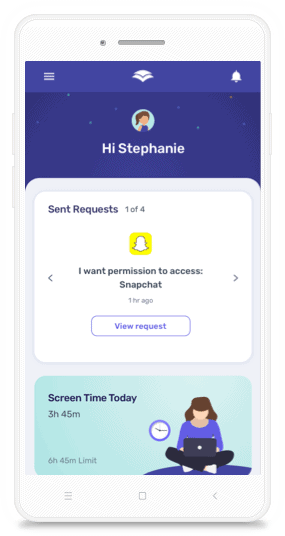
On Android, their experience was positive: downtime scheduling worked correctly, app blocking functioned as expected, and the request system (allowing children to ask permission to use a blocked app) operated smoothly.
What they flagged: On iOS, AllAboutCookies ran into more issues. Some settings they configured did not take effect during testing, and certain features (like geo-fencing alerts) did not trigger. They noted that this is not uncommon with parental control apps on iPhones, since Apple’s operating system restricts what third-party apps can do. However, they called out that Android performance was significantly better.
One area where AllAboutCookies was genuinely impressed: customer support. They reported receiving a helpful response within minutes of reaching out via email, calling it fast and efficient.
We want to be upfront about the iOS experience. Apple’s platform places tight restrictions on third-party apps, which affects all parental control providers to varying degrees. Our development team works continuously to improve iOS compatibility, and we encourage any user experiencing issues to check help center contact our support team at (888) 820-1918 so we can help directly.
Real Parent and User Reviews
Independent expert reviews are valuable, but nothing replaces hearing from parents and users who live with the app day after day. Here is a cross-section of real feedback from the Apple App Store and Google Play.
What Parents Love
A common theme in positive reviews is that parents feel genuine relief after installing Canopy. One App Store reviewer shared that they had been using the app for over a year across two phones and an iPad, describing it as the tool they wished they had found sooner.
They highlighted the flexibility of being able to block categories like social media, gambling, and streaming individually, and praised the parental control dashboard for making approvals easy.
Another user, an adult who switched to Canopy from Covenant Eyes, noted that the base product works reliably and more consistently than other filtering software they had tried. They appreciated that Canopy does not share blurred-out imagery with accountability partners, a privacy-conscious design choice that matters to many adult users.
On Google Play, one reviewer wrote that compared to many other filtering tools, Canopy produced better results. They acknowledged mild device slowdown but emphasized the phone support team’s responsiveness.
Customer support is a thread that runs through many positive reviews. Parents regularly mention fast response times and helpful, patient agents. Our support team is available every day from 12 p.m. to 8 p.m. CT by phone at (888) 820-1918, and we take pride in treating every question seriously.
What Users Wish Were Better
Not every experience is seamless, and we believe in acknowledging that. Some users have reported that Canopy can slow down internet speeds, since the app routes traffic through a VPN to perform real-time filtering.
This is a trade-off inherent to how the technology works: scanning every image and video in real time requires processing. If you experience significant slowdown, our support team can help optimize your setup.
Because Canopy uses a VPN, it is generally incompatible with other VPN apps running on the same device. This is a technical limitation, and if you rely on a VPN for work or personal use, it is worth testing during the free trial period.
A few users have also asked for keyword-based text filtering, a feature we are actively developing. We hear you, and we are working on it.
We read every review, and our product team uses this feedback to prioritize what we build next. If you ever run into an issue, please reach out directly rather than struggling in silence. That is what our support team is here for.
Who Is Canopy Best For?
Canopy is a strong fit if:
- Your primary concern is protecting your family from explicit images and videos across the internet, not just on known adult sites.
- You want an app that filters harmful content within websites and apps rather than blocking them entirely.
- You have a child with a smartphone and you are worried about sexting, both sending and receiving explicit photos.
- You are an adult looking for a privacy-respecting alternative to accountability-based tools like Covenant Eyes. Canopy’s adult plans include an Ally feature that provides accountability without sharing explicit imagery.
- You primarily use Android devices (where Canopy’s full feature set works most reliably).
You may want to look elsewhere (or pair Canopy with another app) if:
- You need deep social media message monitoring, email scanning, or text-based content alerts.
- You want a free plan. Canopy offers a 7-day free trial, but there is no permanent free tier.
Many families find that Canopy paired with a monitoring-focused app gives them the best of both worlds: real-time visual filtering plus text and social media oversight. Learn more about how Canopy blocks explicit content.
Canopy Pricing Overview
Canopy offers plans for both families and adults. All plans include the full feature set: Smart Filtering, sexting prevention, app and website management, location awareness, downtime scheduling, and removal prevention.
Family Plans:
- Individual (up to 3 devices): $7.99/month
- Family (up to 10 devices): $9.99/month
Adult Plans:
- Solo (1 device): $7.99/month
- Multiple (up to 5 devices): $9.99/month
Annual billing is available at a reduced rate. Every plan includes a 7-day free trial and a 30-day money-back guarantee, so you can test it risk-free.
Frequently Asked Questions
Frequently Asked Questions
Is Canopy worth it?
If your top priority is keeping explicit images and videos away from your child’s screen (or your own), Canopy is one of the most effective tools available. Independent reviewers like SafeWise and Cybernews have confirmed that the real-time AI filtering works as advertised.
Where Canopy is more limited is in broader monitoring features like text scanning and deep message monitoring across social apps. Canopy now includes per-app time limits, but families who want an all-in-one monitoring suite may still prefer to pair Canopy with a second tool or explore alternatives.
Does Canopy work on iPhone?
Yes, Canopy works on iPhones and iPads running iOS 12 or higher. That said, Apple’s operating system places restrictions on what third-party apps can do, and some reviewers (including AllAboutCookies) have noted that Canopy’s features work more reliably on Android.
Our team continuously works on iOS improvements, and we recommend taking advantage of the 7-day free trial to test it on your specific device before committing.
How is Canopy different from Bark or Qustodio?
Bark focuses on monitoring text-based communications across dozens of platforms, including social media messages, emails, and texts, flagging concerning content like cyberbullying or predatory language.
Qustodio offers a broad, traditional parental control suite with detailed screen time management, some web filtering, and a free tier.
Canopy’s specialty is different: real-time AI scanning of visual content. Rather than blocking known bad sites from a list, Canopy detects and filters explicit images and videos as they load, on any site. It also alerts you to sexting at the device level. If explicit visual content is your main concern, Canopy addresses that problem more directly than either Bark or Qustodio. Learn more about protecting teens online.
Does Canopy have a free trial?
Yes. Every Canopy plan includes a 7-day free trial with full access to all features. You can cancel at any time during the trial at no charge. Canopy also offers a 30-day money-back guarantee after the trial ends, so there is no risk in trying it out.
Can Canopy be bypassed?
No parental control app is 100% bypass-proof, and any company that claims otherwise is overpromising. That said, Canopy includes several anti-tampering features designed to make circumvention difficult.
Removal Prevention stops children from uninstalling or disabling the app without parental approval, and Removal Alerts notify you immediately if someone tries.
On Android, AllAboutCookies confirmed that they were unable to remove the app without first enabling removal from the parent account.
On iOS, removal is easier due to Apple’s operating system restrictions, but you will still receive an alert if the app is deleted. The most effective approach is combining Canopy’s technical safeguards with open, ongoing conversations about online safety with your child.




![11 Best Porn Accountability Apps For Your Life [2026]](https://canopy.us/wp-content/uploads/2026/01/unnamed.png)