

Your child isn’t just “using the internet.” They’re growing up inside it.
From YouTube before breakfast to TikTok at bedtime, kids today are immersed in a digital world that shapes how they learn, socialize, and see themselves. The internet isn’t somewhere they visit – it’s where they live.
That’s why internet safety for kids has become one of the most important parts of modern parenting. The good news? You don’t need to be a tech expert to protect your child. You just need the right information and a practical plan.
Why Internet Safety for Kids Needs a New Approach
If you grew up in the ’90s or early 2000s, your parents’ internet safety advice probably boiled down to: “Don’t talk to strangers online.” That was reasonable when the internet lived on a family computer in the living room.
Today, that advice is woefully incomplete.
The American Academy of Pediatrics released a major policy update in January 2026 that reframes how we should think about child safety online. The key insight: we can no longer treat digital media as “screen time” that families simply need to manage. Today’s digital ecosystem is intentionally designed around engagement and commercialization—and it lies largely outside individual family control.
Apps and platforms use algorithmic recommender systems, autoplay, intermittent rewards, and endless scrolls to keep your child engaged as long as possible. These aren’t bugs; they’re features.
Online safety for children in 2026 isn’t about blocking the bad stuff and hoping for the best. It requires understanding how digital systems work—and building habits and safeguards that evolve alongside your child.
The Real Risks Kids Face Online Today

Let’s get specific about what you’re protecting your child from. The threats have changed dramatically, and awareness is the first step.
Inappropriate and Harmful Content
This is still the risk most parents think about first—and for good reason. Kids can stumble onto pornography, violence, self-harm tutorials, and extremist content with just a few clicks or swipes. According to one study, nearly 3 in 4 teens (73%) report being exposed to pornography, either accidentally or intentionally.
But here’s what many parents miss: filters alone often fail. Harmful content can appear in recommendations, search results, user-generated videos, and even chat features within games. That’s why tools that use AI to analyze content in real time, like Canopy’s Smart Filter, are more effective than simple blocklists.
Online Predators and Grooming
Grooming doesn’t happen in the places you might expect. It happens in gaming chats, on social apps, through direct messages, and even in comment sections. Predators often pose as peers, building trust over weeks or months before escalating.
The AAP’s 2026 policy statement specifically warns about “privacy settings and recommendations that connect minors with strangers and put them at risk of exploitation or trafficking.” Many platforms, by default, allow anyone to send friend requests or direct messages to minors, settings that parents need to manually restrict.
Where grooming commonly occurs:
- Multiplayer game chats (Roblox, Fortnite, Minecraft servers)
- Social media DMs (Instagram, Snapchat, TikTok)
- Discord servers and group chats
- Live streaming platforms
- Comment sections on YouTube and TikTok
Red flags parents often miss:
- Your child mentions a new “friend” they met online but won’t share details
- They receive gifts, game credits, or money from someone you don’t know
- They become secretive about certain apps or conversations
- Emotional changes, withdrawal, anxiety, or mood swings tied to device use
- Staying up late for private conversations
If you notice these signs, don’t panic, but do start a conversation. Our guide on how to talk to your child about inappropriate pictures can help you approach this sensitive topic without shutting down communication.
Cyberbullying
Unlike schoolyard bullying, cyberbullying follows kids everywhere—into their bedroom, onto their phone, through the night. It’s persistent, often anonymous, and can feel inescapable. Research consistently links cyberbullying to worse psychological well-being, including anxiety and depression.
Teaching kids how to respond (block, report, tell a trusted adult) is important. But so is monitoring their digital interactions. Text monitoring apps can alert you to concerning conversations without requiring you to read every message.
Privacy and Data Exploitation
Most kids don’t realize that every app they use is collecting data about them—their location, their preferences, their browsing habits, even their face. This data can be used for targeted advertising, sold to third parties, or exploited in ways we don’t fully understand yet.
The AAP policy statement specifically warns about “data collection and profiling that can infer a teen’s interests in unsafe activities such as drugs, alcohol, gambling, pornography, or extreme diets/fitness.” In other words, algorithms aren’t just showing your child content—they’re building a profile of their vulnerabilities and targeting them accordingly.
This matters for several reasons. Targeted advertising can manipulate kids into unhealthy behaviors or purchases. Data breaches can expose personal information. And the digital footprint your child creates today can follow them into adulthood—affecting college admissions, job prospects, and relationships.
Practical steps to protect your child’s privacy:
- Review app permissions together and disable unnecessary access to location, microphone, and contacts
- Teach kids to think before they share: “Would I be okay if my teacher or future employer saw this?”
- Regularly audit which apps have access to what data on their device
- Use parental controls to enforce privacy boundaries they might not maintain on their own
Algorithmic and Social Media Harm
This is the risk that gets the least attention but may cause the most damage. Social media platforms are designed to keep users scrolling through likes, notifications, and infinite feeds. For teens, this can amplify anxiety, fuel comparison culture, and reinforce unrealistic body standards.
The AAP notes that early adolescence (ages 11–14) may be a period of particular vulnerability to negative effects from social media. This is exactly the age when many kids are getting their first smartphones and social accounts. Instagram parental controls, TikTok parental controls, and Snapchat parental controls can help you set guardrails during this critical window.
Internet Safety by Age Group
Not all kids face the same risks or need the same approach. Here’s how to adapt your strategy as your child grows.
Internet Safety for Young Kids (Ages 5–8)
At this age, the goal is simple: supervised, high-quality, content-only experiences. Young children shouldn’t be browsing the open internet or using social apps.
What works:
- Use kid-specific platforms like PBS Kids, designed with child development in mind
- Keep devices in shared spaces where you can see what’s happening
- Watch content together when possible—research shows “joint media engagement” strengthens learning
- Set clear rules: devices charge outside the bedroom, no screens during meals
- Consider delaying personal tablets; a shared family tablet is easier to monitor
For toddlers and preschoolers, less than 1 hour per day of high-quality content is a reasonable target. But quality matters more than the clock.
Internet Safety for Tweens (Ages 9–12)
This is when things get complicated. Tweens start wanting more independence, exploring YouTube, gaming with chat features, and possibly their first social accounts. Your job shifts from gatekeeper to guide.
What works:
- Have ongoing conversations about what they’re seeing and doing online—not interrogations, but genuine curiosity
- Teach them to recognize red flags: strangers asking personal questions, content that makes them uncomfortable, pressure to keep secrets
- Introduce parental control apps for cell phones that give you visibility without reading every message
- Set up family rules together, kids follow rules better when they help create them
- Learn how to block websites on their devices and on your router for network-wide protection
- Help them create a Gmail account for kids with appropriate safety settings
Conversations to have at this age:
- What information is safe to share online vs. what should stay private
- How to handle uncomfortable situations (someone asking for photos, seeing scary content)
- Why some content has age restrictions—not to be mean, but because it can genuinely affect developing brains
- The difference between online friends and real-life friends
- What to do if someone they know is being bullied—or if they’re tempted to pile on
The AAP doesn’t recommend a specific age for a first phone because readiness varies by child. Considerations include: digital literacy, truthfulness with parents, ability to navigate social conflict, and practical needs. Use the AAP PhoneReady Questionnaire to start the conversation.
Internet Safety for Teens (Ages 13–16)
Teenagers need more autonomy—but they still need support. The balance between trust and oversight is tricky, and there’s no perfect formula. What worked last year might not work this year as they mature.
What works:
- Shift from control to coaching; ask questions, share your thinking, explain why certain boundaries exist
- Talk openly about difficult topics: sexting, social pressure, mental health, digital reputation
- Use tools like text monitoring apps and Discord parental controls that provide alerts for concerning content rather than constant surveillance
- Discuss how algorithms work and why they might be seeing certain content in their feeds
- Make sure they know how to block content on TikTok, report harassment, and protect their privacy
- Keep the lines of communication open so they come to you when something goes wrong
Topics teens need to understand:
- Sexting and image sharing: The legal consequences (child pornography laws can apply even to minors sharing their own images), the permanence of digital content, and how to respond if someone pressures them or shares their images without consent
- Digital reputation: How colleges and employers search applicants online, and why something “funny” at 14 can haunt them at 24
- Mental health and social media: The connection between heavy social media use and anxiety or depression, and how to recognize when scrolling is making them feel worse
- Healthy relationships online: What respectful communication looks like, recognizing manipulation or control, and when to block someone
Research suggests that teens with supportive parental involvement have better outcomes with digital media. The goal isn’t to spy, it’s to stay connected and available when they need guidance.
How to Teach Kids About Online Safety

The most effective protection isn’t an app or a filter. It’s a child who knows how to recognize risks and make good decisions.
Conversations Over Restrictions
Blocking and filtering have their place, but they can’t prepare your child for the day they encounter something you didn’t anticipate. Regular, low-pressure conversations do.
The AAP recommends using “if-then” scenarios to build digital literacy without lecturing. These feel less like interrogations and more like problem-solving together.
Sample conversation starters by age:
For younger kids (5-8):
- “What’s your favorite thing to watch? Can we watch it together?”
- “Has anything on the tablet ever scared you or made you feel weird?”
- “If a game asked you for your name or where you live, what would you do?”
For tweens (9-12):
- “What apps are your friends using? What do they like about them?”
- “Has anyone ever said something mean to you online, or have you seen someone else get picked on?”
- “If someone you don’t know sent you a message, what would you do?”
For teens (13-16):
- “What’s the most interesting thing you’ve seen online this week?”
- “Do you ever feel worse about yourself after scrolling? When?”
- “If something bad happened, like someone sharing a photo you didn’t want shared, would you feel okay telling me?”
The goal isn’t to have one big “talk” but to make digital life a normal topic of conversation, like school or friendships. Kids who talk to their parents about online experiences are more likely to come forward when something goes wrong.
Teaching Critical Thinking
Kids need to understand that not everything online is true, kind, or meant for them. Teach them to ask: Who created this content and why? Is this trying to sell me something? How would I verify if this is true?
Setting Boundaries and Healthy Habits
Work with your child to establish boundaries like:
- No devices in bedrooms at night (avoid screens an hour before bed)
- Phone-free zones during meals and homework
- Agreed-upon screen time limits
The goal isn’t rigid control – it’s helping your child develop self-regulation skills they’ll need as adults.
Give Your Family a Safer Digital Experience
Looking for a practical way to protect your child online without constant monitoring?
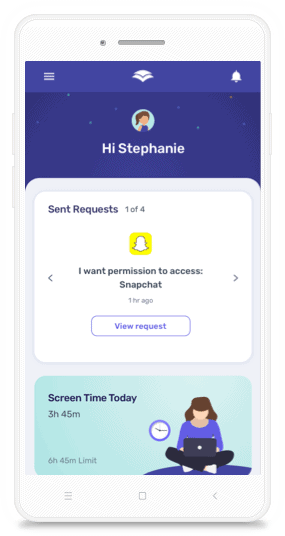
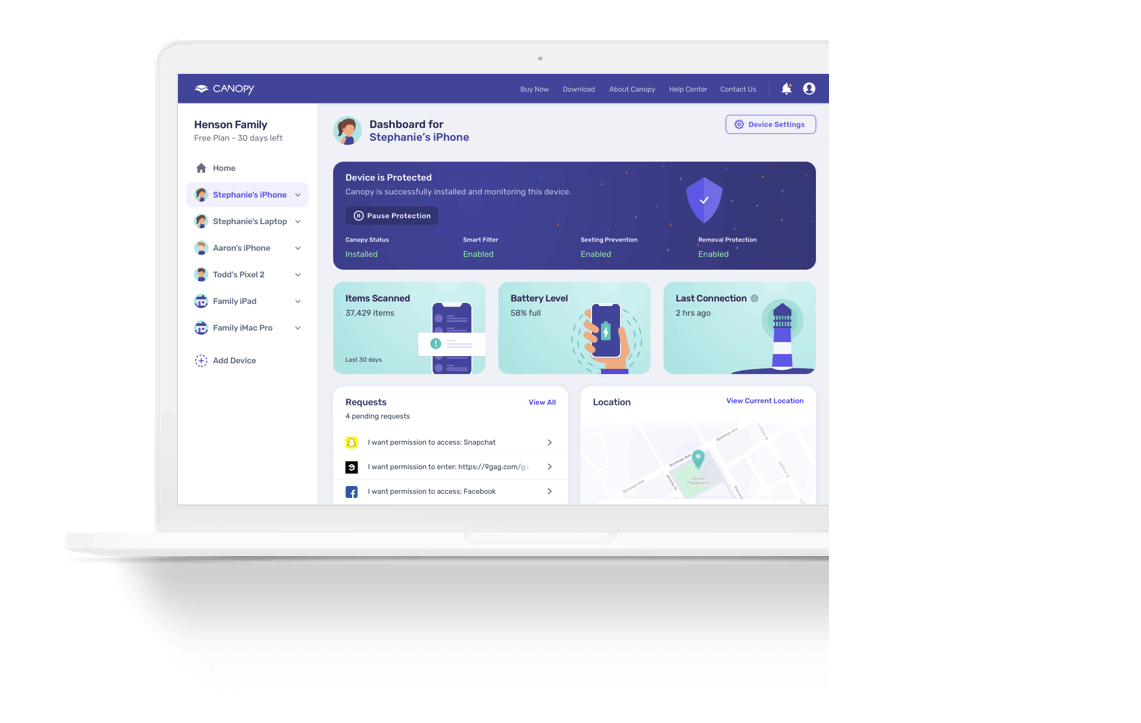
Canopy combines AI-powered content filtering, real-time alerts, and app management to help you set healthy boundaries while giving kids room to explore. Unlike basic blocklists, Canopy analyzes content as it loads, so inappropriate images never reach your child’s screen.


![11 Best Porn Accountability Apps For Your Life [2026]](https://canopy.us/wp-content/uploads/2026/01/unnamed.png)